



3D Printer comes to BJS
- Jun 22, 2023
- 1 min read
Mr Newberry gave the Year 6 children an exciting opportunity of using a 3D Printer! He trained the i-Vengers up first to lead the sessions. I-Vengers, Ava T and Harry, have documented the process below. Year 6s cannot wait to sell some of the things they have made this week!
How do you use the 3D printer?
There are 3 steps in the process to making your 3D object. You have different apps for different printers. In our school we have used 'Tinkercad'.
Step 1


Go on to Tinkercad. Press on 'start tinkering'. After that, it will say 'Students join a class' - press that! It will ask you to enter a code. Then, you can put in your nickname.
Step 2


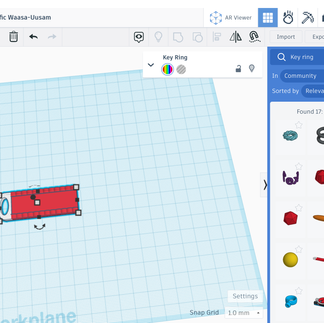


Press 'create', then press '3D designs'. Once you have done that, you press the 'search button', where you can search for objects which have already been entered, like a key ring or bookmark. Once you have done that, you get the 'search up text'. This is your chance to alter the object and play around with it.
Step 3


Now, you need to go to an adult - teacher or head teacher - and they will put your designs onto their laptop, which will allow them to send it to be printed. This is the fun part! They will start to print on the 3D printer. You must apply a layer of glue to it before, so the plastic doesn't stick!
Year 6 i-Vengers - Ava T and Harry
Comments